AppScoutAppScout.gallery
Flight Breaks icon
Utilities

Flight Breaks

by Joseph Lyons
Rating0.0(0)
Price$0.99
Updated4y ago
Released8y ago
Latest rank
#91
Top Paid · Utilities
Rank change
↓ 22
vs last refresh
Rank history
Charting in:CA·Top Paid#91↓22

Screenshots

Flight Breaks screenshot 1Flight Breaks screenshot 2Flight Breaks screenshot 3Flight Breaks screenshot 4Flight Breaks screenshot 5Flight Breaks screenshot 6Flight Breaks screenshot 7Flight Breaks screenshot 8

Estimates

low confidence
Downloads / month
21K–213K
Chart-rank signal only
Revenue / month
$15K–$148K
After Apple's 30% cut

ASO analysis

Title13 / 30
Flight Breaks

Good use of the title field.

Description1,387 / 4,000
5 paragraphs · 35% of limit used

Could go longer. The first 252 chars are above-the-fold; everything else still indexes.

Top keywords in your description
time×13flight×9break×6breaks×6airline×3crews×3rest×3change×2divide×2periods×2set×2specific×2
Keyword opportunities

Used by similar apps in your niche, but not in your title or description. Adding these (where genuinely relevant) can broaden your search reach.

calculator7 peershours7 peersmultiple5 peersadd4 peersautomatically4 peersclock4 peersenter4 peersfind4 peershourly4 peersprivacy4 peers
Shared niche keywords

Words you and your peers both use. Confirms positioning in this niche.

time9 peersdesigned5 peersfeatures5 peerseasy4 peerssimple4 peerswork4 peersavailable3 peersback3 peersduration3 peerseven3 peers

Keyword rankings

iTunes Search · top 200
Keyword tracking starts automatically for apps on the top charts — ranks appear after the next data refresh. Manual tracking for search-only and niche apps coming soon.

About

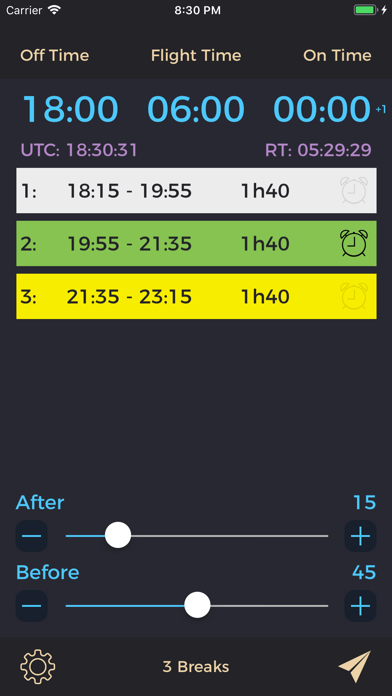
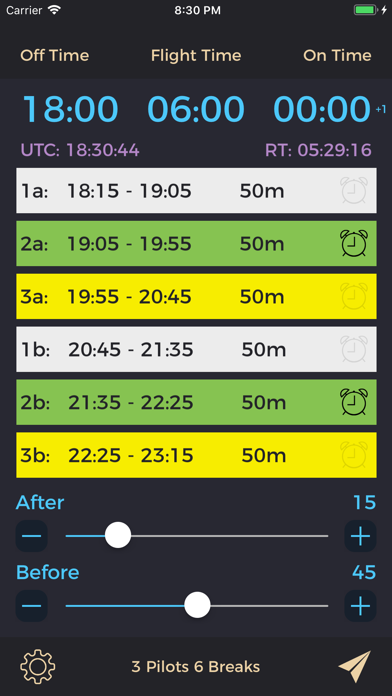
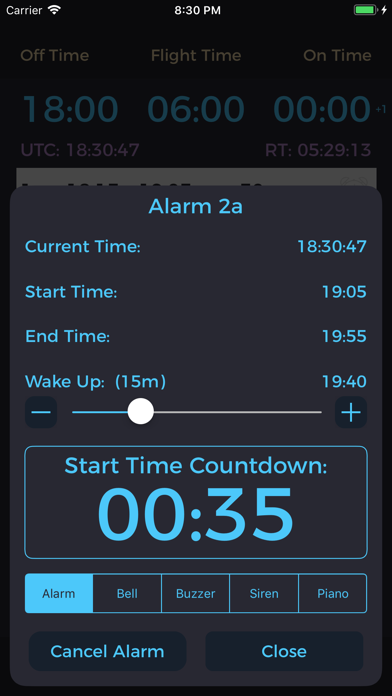
Flight Breaks is an intuitive and simple way for airline crews or pilots to seamlessly calculate rest periods on augmented international or long-haul flights. The app is designed for airline crews worldwide who need to divide up specific amounts of flight time for determining rest and work periods. Simply set the “Off Time” (take off time), then set the “Flight Time” (duration of flight) as shown on your flight plan, and the “On Time” (land time) is calculated. Additionally, if the “On Time” changes significantly (longer or shorter) due to short cuts or favorable/unfavorable winds, you can change the “On Time” to match the flight computer. This will then in turn alter the flight time and breaks accordingly. Various break options are available depending on how your airline or crew wants to divide up the breaks. The parameters for when the first break starts and when the last break ends are easy to change. There’s even an option for the amount of time in between breaks too! Features include: • Alarms for your specific break with countdown timers until your wake up time. • Share the break schedule with others who have the app by AirDrop or E-mail. You’ll always know how much time remains until your break is over to ensure you’ll be back to the flight deck on time! Flight Breaks. The effortless way for crews to figure out rest breaks.

01
Flight Computer Pro icon
Flight Computer Pro
Diego Rodrigues
4.7
02
CX-3 Flight Computer icon
CX-3 Flight Computer
ASA
2.3
03
R44 Weight & Balance icon
R44 Weight & Balance
Michael Connor
4.2
04
C-17 Duty Day Calc icon
C-17 Duty Day Calc
John Robbins
4.2
05
Time Calculator - Work Hours icon
Time Calculator - Work Hours
Oval Software Oy
4.7
06
Hours Tracker: Work Calculator icon
Hours Tracker: Work Calculator
Daniel Lewis
4.3
07
Holiday Pay Calculator icon
Holiday Pay Calculator
Michael Savacool
4.0
08
Geofency - Time Tracking icon
Geofency - Time Tracking
Karl Heinz Herbel
4.7
09
Time Tracker – Punchino icon
Time Tracker – Punchino
Johann Wahlmueller
4.0
10
Countdown: Big Timer & Clock icon
Countdown: Big Timer & Clock
BitBit Apps
4.3