Soro - For Sonos
Screenshots




Estimates
low confidenceASO analysis
Good use of the title field.
Solid length. Make sure the first 252 chars hook the reader.
Used by similar apps in your niche, but not in your title or description. Adding these (where genuinely relevant) can broaden your search reach.
Words you and your peers both use. Confirms positioning in this niche.
Keyword rankings
iTunes Search · top 200About
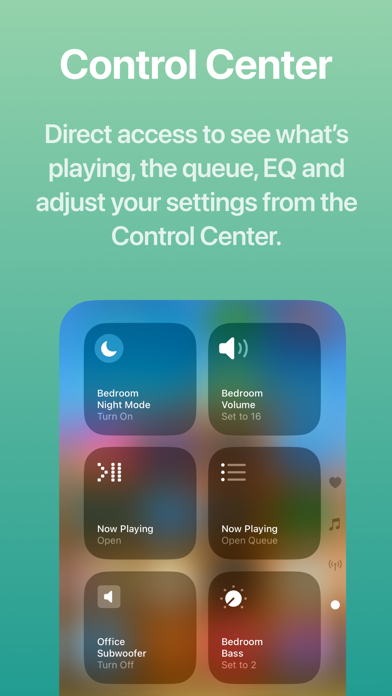
▶ NEW: Soro is now updated with a Liquid Glass redesign, music services support** and extended Apple Music integration, both in-app and in the Shortcuts app. Soro provides modern, intuitive user interface to control your speakers, extends your iPhone, iPad, and Mac with Control Center and Home Screen widgets, Live Activities and 30+ powerful Shortcuts actions. Soro lets you create both quick actions or extensive workflows to control your speakers with the Shortcuts app using widgets, Siri voice commands or automations. ▶ Control Center * Instantly adjust speaker settings from anywhere * One tap to open Now Playing, Queue, and EQ views right from the Control Center ▶ Modern Interface * Modern design that feels at home on iOS and iPadOS ▶ Browse Your Music * Support for Music Services that you already added in the Sonos app (YT Music is not supported currently) * Browse your Sonos Music Library ▶ Extended Apple Music Integration * Add tracks, albums to your Apple Music playlists or favorites (in-app and via Shortcuts action) * Play artist stations * See additional details of albums and artists, such as related items and notes ▶ Learn About What’s Playing * Chat-based web search to explore songs, albums, artists, and more—right from inside Soro ▶ Live Activity, Widgets & Shortcuts * Revamped Live Activity with more controls—jump directly to EQ and queue * Lock Screen, Home Screen & StandBy Mode widgets for instant access * App Shortcuts for Spotlight, Siri, and the Action Button ▶ Speak Text on Your Speakers * Send announcements or media with built-in text-to-speech * Playback resumes automatically when the message ends * Works across supported Sonos speakers* ▶ Shortcuts & Automations * 30+ actions to control your speakers in the Shortcuts app * Build quick actions or extensive automations or integrate with other third-party apps * Examples included in the app to get you started ▶ Available Actions Play - Play Sonos Music - Play Favorite - Play Sonos Playlist - Play Sonos Music Library - Play Apple Music Artist Station - Play URL - Speak Text - Play Audio Clip Queue - Get Queue - Go To Track in Queue - Clear Queue - Save Queue Input/Source - Use TV Input - Use Line-In - Use Queue Playback Control - Control Playback: Play, pause, skip, or seek - Select MP3 Chapte Rooms and Groups - Now Playing - Group/Ungroup - Wake Speaker - Create Stereo Pair - Separate Stereo Pair - Set Direct Connect IP Settings - Sonos Settings: Change speaker or group settings like volume, bass/treble, loudness, speech enhancement, night mode, surround settings, subwoofer settings, trueplay, and more. - Load Sound Preset: Apply a saved sound/EQ preset to a room or its group. - Get Battery Status Alarms - Create Alarm - Update Alarm - Delete Alarm App / Live Activity / Widgets - Open Soro: Open the Soro app to a specific screen (Select, Queue, EQ, or selected Music Service), optionally targeting a room, defaults to currently playing. - Start/Update Live Activity - End Live Activity - Reload Widgets Apple Music - Add Track to Apple Music Playlist - Favorite Track in Apple Music Playlist management - Add Music to Sonos Playlist * Speak Text supported on Sonos One, Amp, Port, Play:5 (Gen 2), Beam, One SL, Move, SYMFONISK (table lamp & bookshelf), and all newer Sonos S2 speakers. ** Currently YouTube Music is not supported Soro is not affiliated with Sonos Inc. nor is it an official Sonos app. Sonos is trademarked by Sonos Inc.