

Watch Cam for Nest Cam
Screenshots


Estimates
low confidenceASO analysis
Good use of the title field.
Solid length. Make sure the first 252 chars hook the reader.
Used by similar apps in your niche, but not in your title or description. Adding these (where genuinely relevant) can broaden your search reach.
Words you and your peers both use. Confirms positioning in this niche.
Keyword rankings
iTunes Search · top 200About
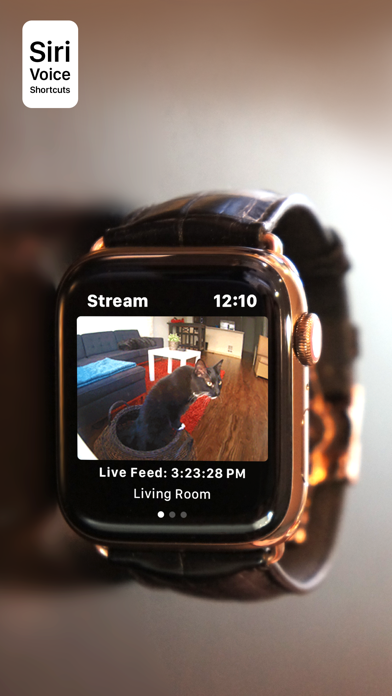
Apple Watch, Nest Cam, and Siri together. What a sight! The app has Siri Voice shortcuts, and they can be used to set your home into Away or Home state using Siri on your Watch or iPhone, as well as to display the live feeds from your cameras. The app supports Apple Watch LTE, and can work when the iPhone is not around - as long as the watch itself has internet access (either LTE or WiFi). The app is fully functional with the initial purchase. In-app purchases are available only for tipping the developer. Watch Cam lets you monitor all your Nest Cams from the Apple Watch. • From the watch face, tap on the Watch Cam complication to open the app. Swipe left and right to view life feeds from all your Nest Cams. • One of the watch complications shows you the snapshot from the camera of your choice, right on the watch face. • View the continuously updated Live Feed from the camera in the watch app, iOS app, or with Siri. Newer cameras show live video in the iOS app and Siri. Older cameras show snapshot images that update every second. The feed updates with a new snapshot image every few seconds on the Watch - may be faster or slower, depending on your network speed. • Use the digital crown on the Watch to zoom in and out, or tap the screen to toggle zoom levels. • Use the pinch gesture on the camera views in the iOS app to zoom in and out. Single tap toggles the zoom level in the iOS app and the iOS widget. • Turn the device to landscape mode to increase the camera views sizes. • Double tap on the Live Feed view in the iOS app or the widget to launch the Nest app. • Set Geofence around your home to reliably set the Home and Away state when you come and go. Watch Face Complications can display the following: • Snapshot from the camera of your choice. • Camera icon that opens the app. You can long-press the Watch screen for additional functions, like setting the home/away status, or turning the camera streaming on and off. While the app's minimalist looks betray the simplicity of its operation, what they don't show is the amount of planning, design, development and refinement that went into it, ensuring it becomes something that is enjoyable to use and experience. Please Note: Watch Cam does not collect any of your data. Your login information, camera feeds, and any activity - all of it flows exclusively between your devices and Nest. Author of Watch Cam does not receive any of it, at any point. This app and its developer are unaffiliated with Google Inc. or Google Nest. Nest is a trademark of Google Inc.


