AppScoutAppScout.gallery
Air Camera icon
Photo & Video

Air Camera

by Marc Castles
Rating2.5(4)
Price$0.99
Updated5y ago
Released10y ago
Latest rank
Not tracked yet
Rank change
Not tracked yet
Rank history
Movement appears after the next data refresh.

Screenshots

Air Camera screenshot 1Air Camera screenshot 2

Estimates

low confidence
Downloads / month
30K–304K
Chart-rank signal only
Revenue / month
$21K–$211K
After Apple's 30% cut

ASO analysis

Title10 / 30
Air Camera

Short title. You're leaving keyword space on the table.

Description1,135 / 4,000
3 paragraphs · 28% of limit used

Could go longer. The first 252 chars are above-the-fold; everything else still indexes.

Top keywords in your description
video×4camera×3supported×3airplay×2apple×2center×2control×2devices×2display×2external×2focus×2overlay×2
Keyword opportunities

Used by similar apps in your niche, but not in your title or description. Adding these (where genuinely relevant) can broaden your search reach.

recording8 peersadjust7 peersbalance7 peerscontrols7 peersiso7 peersmanual7 peerssupport7 peersvideos7 peersinterface6 peersshutter6 peers
Shared niche keywords

Words you and your peers both use. Confirms positioning in this niche.

camera9 peersvideo9 peerscapture8 peerscontrol8 peersexposure8 peersfocus8 peersiphone8 peerstime8 peersapple7 peersfeatures6 peers

Keyword rankings

iTunes Search · top 200
Keyword tracking starts automatically for apps on the top charts — ranks appear after the next data refresh. Manual tracking for search-only and niche apps coming soon.

About

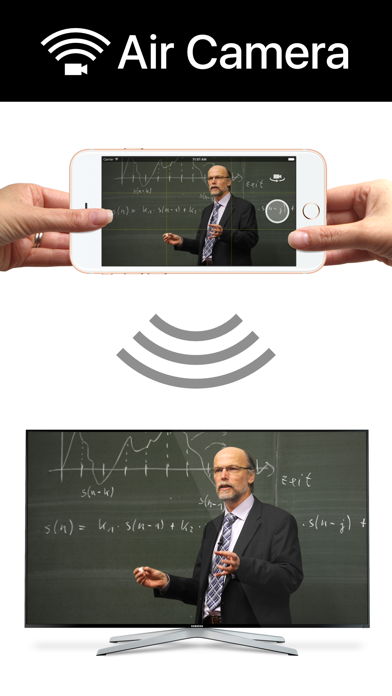
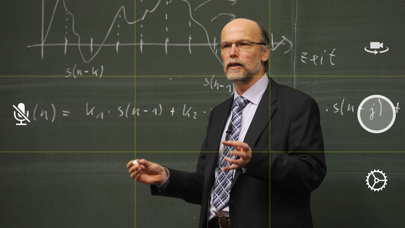
Air Camera is the best way to stream your camera to an airplay receiver. eg. Apple TV, AirParrot or AirServer. Perfect for live events when you need a simple video feed to an external display. The external display only shows the video so elements like notifications, battery status and time don't distract your audience. Features: • Rule of Thirds overlay shows on device. • Double Tap to goggle Rule of Thirds overlay. • Press and hold to lock focus & exposure on supported devices • Smooth focus is enabled on supported devices. • Left & Right Landscape orientation supported. • Universal App (iPhone & iPad) • Also supports Apple AV adapter. • Take full resolution photos (with 3 second preview) during capture. High quality photos are saved to the camera roll. • Swap between Front, Back, Telephoto and Wide Angle cameras. • Pinch to zoom in and out • Video Stabilisation - Standard or Cinematic • Choose Video Quality - 720p, 1080p or 4k • Toggle Audio on or off Instructions for Use: 1. Open Control Center (swipe up from bottom of screen) 2. Tap AirPlay 3. Select the target screen and enable mirroring 4. Close Control Center

01
SP Camera icon
SP Camera
Ratha Sou
4.4
02
Studio Camera icon
Studio Camera
Rafael Guilherme Bertholdo
0.0
03
AirPlay Cast icon
AirPlay Cast
Taro Aso
4.0
04
Clean Camera for Stream Feed icon
Clean Camera for Stream Feed
Thomas Backes
3.6
05
DSLR Camera icon
DSLR Camera
Fulvio Scichilone
4.4
06
ProCam - Pro Camera icon
ProCam - Pro Camera
Tinkerworks Apps
4.5
07
Blackmagic Camera icon
Blackmagic Camera
Blackmagic Design Inc
4.7
08
NightCap Camera icon
NightCap Camera
RTD
4.3
09
Beastcam - Pro Camera icon
Beastcam - Pro Camera
BeastGrip
3.1
10
Manual Camera 4 icon
Manual Camera 4
Kenneth Kao
4.6