AppScoutAppScout.gallery
Datum - Calendar icon
Utilities

Datum - Calendar

by Michael Lindinger
Rating0.0(0)
Price$1.99
Updated5mo ago
Released5y ago
Latest rank
Not tracked yet
Rank change
Not tracked yet
Rank history
Movement appears after the next data refresh.

Screenshots

Datum - Calendar screenshot 1Datum - Calendar screenshot 2Datum - Calendar screenshot 3Datum - Calendar screenshot 4

ASO analysis

Title16 / 30
Datum - Calendar

Good use of the title field.

Description1,073 / 4,000
4 paragraphs · 27% of limit used

Could go longer. The first 252 chars are above-the-fold; everything else still indexes.

Top keywords in your description
widget×7calendar×6day×6shows×6events×5current×3date×3event×3ios×3marks×3show×3small×3
Keyword opportunities

Used by similar apps in your niche, but not in your title or description. Adding these (where genuinely relevant) can broaden your search reach.

choose5 peersfeatures5 peersiphone5 peerstime5 peerscolor4 peersdata4 peersdays4 peersholidays4 peersimportant4 peersmultiple4 peers
Shared niche keywords

Words you and your peers both use. Confirms positioning in this niche.

calendar10 peersevents7 peersdate5 peersday4 peersview3 peers

Keyword rankings

iTunes Search · top 200
Keyword tracking starts automatically for apps on the top charts — ranks appear after the next data refresh. Manual tracking for search-only and niche apps coming soon.

About

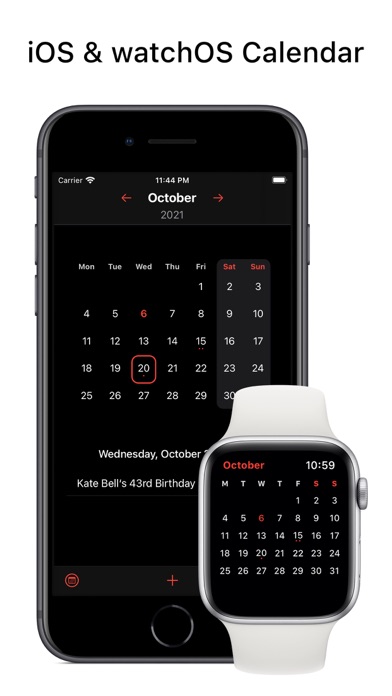
Datum is a minimalistic iOS, watchOS, macOS and visionOS calendar app. For iOS there are Lockscreen Widgets that show you the current date and there are Lockscreen Widgets that show up to 3 events for today. The iOS and macOS apps include the following widgets: - a small widget that shows the current date and at the bottom the events for this day - a small widget that shows a calendar with up to 3 event marks for each day - a medium widget that shows the same as the first small widget and on the right side a calendar with up to 3 event marks for each day - a large widget that shows the same as the medium widget and a list of the upcoming events - a extra large widget that shows a calendar and a list of the upcoming events (only for iPadOS 15+) The watchOS app shows a calendar with up to 3 event marks for each day. You can switch to the next/previous month by tapping on the arrows at the bottom of the calendar. You can view all events for each day by tapping on a day. There are also complications for all watchfaces included that show you the current date.

01
Hebrew Calendar & Dates icon
Hebrew Calendar & Dates
Teeserted OU
0.0
02
LCD Clock - Clock & Calendar icon
LCD Clock - Clock & Calendar
forYou inc.
5.0
03
shift calendar pro icon
shift calendar pro
Alex Gugel
4.4
04
Calendar Timeline icon
Calendar Timeline
Kevin Lieser
3.3
05
Calendar Importer icon
Calendar Importer
Vance Alexander
4.1
06
CalCs - Calendar Complications icon
CalCs - Calendar Complications
Akihiro Usui
4.6
07
Firefighter & EMS Calendar icon
Firefighter & EMS Calendar
Chase Henslee
1.0
08
Export Calendar - CSV & ICS icon
Export Calendar - CSV & ICS
OpsOh LLC
0.0
09
Nomo - Notion Monthly Calendar icon
Nomo - Notion Monthly Calendar
邵伟 黄
0.0
10
Old Device Clock & Calendar icon
Old Device Clock & Calendar
Taichi Umeki
0.0