AppScoutAppScout.gallery
Kudos Boards icon
Productivity

Kudos Boards

by ISW
Rating0.0(0)
PriceFree
Updated6y ago
Released10y ago
Latest rank
Not tracked yet
Rank change
Not tracked yet
Rank history
Movement appears after the next data refresh.

Screenshots

Kudos Boards screenshot 1Kudos Boards screenshot 2Kudos Boards screenshot 3Kudos Boards screenshot 4

ASO analysis

Title12 / 30
Kudos Boards

Good use of the title field.

Description1,064 / 4,000
5 paragraphs · 27% of limit used

Could go longer. The first 252 chars are above-the-fold; everything else still indexes.

Top keywords in your description
connections×6user×4boards×3kudos×3activities×2contact×2experiencing×2ibm×2please×2problem×2server×2access×1
Keyword opportunities

Used by similar apps in your niche, but not in your title or description. Adding these (where genuinely relevant) can broaden your search reach.

board9 peerstasks8 peersprojects7 peerscreate6 peersfeatures6 peersmanage6 peersprogress6 peerssimple6 peerstask6 peerswork6 peers
Shared niche keywords

Words you and your peers both use. Confirms positioning in this niche.

kanban8 peersproject7 peersboards6 peersproductivity5 peerssupport5 peersvisual5 peersworkflow5 peersaccess4 peerscollaboration3 peers

Keyword rankings

iTunes Search · top 200
Keyword tracking starts automatically for apps on the top charts — ranks appear after the next data refresh. Manual tracking for search-only and niche apps coming soon.

About

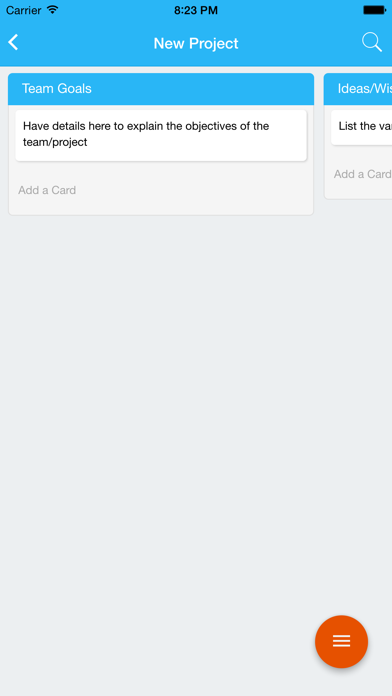
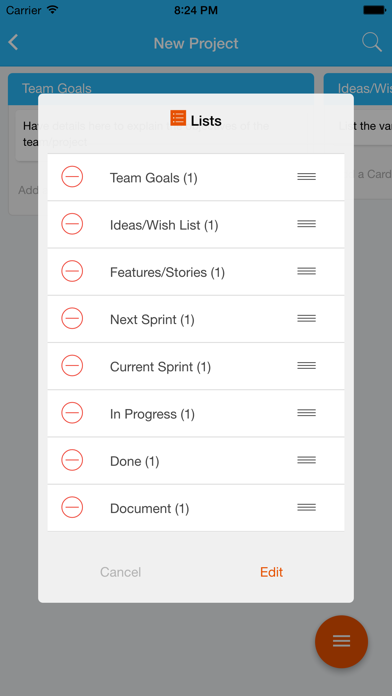
Official mobile client for the Kudos Boards application for IBM Connections. Compatible with on-premise installations of IBM Connections and Kudos Boards for Websphere. Kudos Boards transforms the user experience and productivity gained from Connections Activities. It seamlessly integrates with your Connections environment and existing activities. Based on the proven workflow methodology known as kanban, it provides an intuitive user interface complete with drag-and-drop lists and cards, colour-coding, customisable categories and tags; and lots more to unlock true team-based, visual project collaboration. ---------------------------------------------------------------------- In order to access your company's Connections server, you will need a user name and password along with the URL address of the server. The app will prompt you for this information. If you are an end user and experiencing a problem, please contact your company IT help desk. If you are a Connections administrator experiencing a problem, please contact support@kudosboards.com.

More from ISW

01
Huddo Boards icon
Huddo Boards
ISW
0.0
01
Huddo Boards icon
Huddo Boards
ISW
0.0
02
Boards - Personal Taskboards icon
Boards - Personal Taskboards
Kitestack Software
4.9
03
Boardly - Project & Task Board icon
Boardly - Project & Task Board
Jakub Kalamarz
0.0
04
BoardEffect icon
BoardEffect
Diligent Corporation
3.3
05
Project Board icon
Project Board
Suresh Karpatiya
0.0
06
SwiftKanban icon
SwiftKanban
Digité, Inc.
0.0
07
Taskity - Kanban Board icon
Taskity - Kanban Board
tvisha
3.0
08
KanbanBoard - Organize tasks icon
KanbanBoard - Organize tasks
naoki otsu
0.0
09
Kanba : Agile Kanban Board icon
Kanba : Agile Kanban Board
Charles Zimmerlin
4.8
10
Drawboard Projects icon
Drawboard Projects
Drawboard Pty Ltd
3.3