

LTE Cell Info: Network Status
Screenshots

ASO analysis
Tight against the limit — verify it doesn't truncate on small screens.
Could go longer. The first 252 chars are above-the-fold; everything else still indexes.
Used by similar apps in your niche, but not in your title or description. Adding these (where genuinely relevant) can broaden your search reach.
Words you and your peers both use. Confirms positioning in this niche.
Keyword rankings
iTunes Search · top 200About
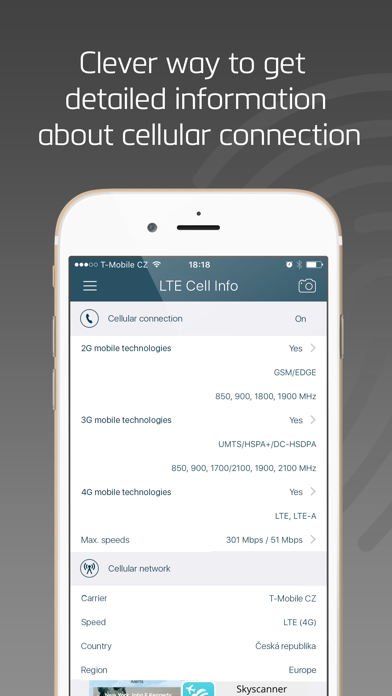
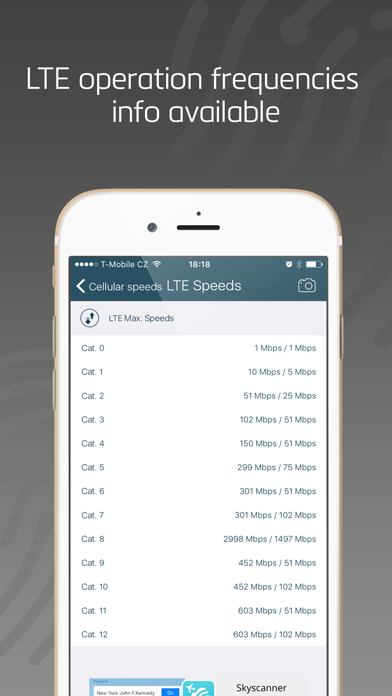
LTE Cell Info is a great multifunctional tool, which helps you to gather all the information you need to know about your cellular connection. It is a clever way how to get all the details about your current carrier, the connection mode or even detect max. physical cellular speeds in the supported mobile technologies. FEATURES: CARRIER INFO • Detect current connected mobile network operator name, country, region. • Show the carrier identification MCC and MNC codes. • Detect current cellular connection mode (GPRS, EDGE, UMTS, HSPA, LTE). • Detect LTE operation bands supported by your carrier. CELLULAR CONNECTION INFO • Detect mobile generations and standards supported by your device (2G, 3G, 4G, GPRS, EDGE, UMTS, HSPA, LTE, VOLTE). • Detect device supported GSM, UMTS and LTE operation frequencies and channels with detailed band informations. • Detect max. physical cellular speeds in the supported mobile technologies. REACH UI FEATURES • Hamburger menu • Use the camera icon (upper-right corner) to create and print/send/share a screenshot from the entire page. • Pull down with your finger to refresh the informations


