

Talking Calculator
Screenshots



ASO analysis
Good use of the title field.
Solid length. Make sure the first 252 chars hook the reader.
Keyword rankings
iTunes Search · top 200About
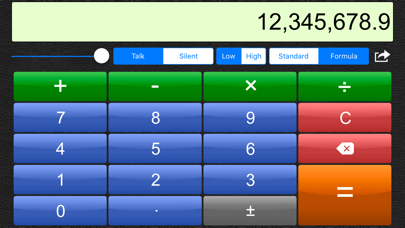
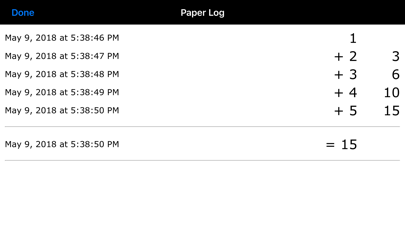
A comprehensively featured calculator that has quickly become a favourite among adults and primary schools around the world. Designed for a wide range of users, this calculator has large colourful buttons, optional high contrast, full VoiceOver support, and unique to this calculator; the option to use speech for answers, button names and formulas! *** Showcased by Apple Australia at the Association of Special Education Administrators in Queensland Inc. Conference 2011 *** "We have found it particularly useful to students with developmental delays." - Apple (Australia) If you’re looking for a talking calculator with scientific or fraction operators, then please look for this app's big brother, the Talking Scientific Calculator. If you're looking for statistics functionality, then please check out the new Talking Statistics Calculator app. Talking Calculator's features include: ------------------------------------------------- - Select between two user-interfaces: standard calculator, and ultra-simple, which is ideal for young children. - Reads answers, entered numbers and formulas aloud. For example: 1,234.56 is spoken as "One thousand, two hundred and thirty four point five six." 2 + 5 x 3^2 is spoken as "two plus five multiply three squared" - Two entry modes, Standard and Formula. Standard mode emulates traditional calculators: You need to be mindful of the 'order of operations'. Formula mode takes care of the order of operations for you. You enter a mathematical expression, complete with operators and parentheses (brackets), tap the EQUALS button, and the expression is evaluated. This is similar to using formulas in Microsoft Excel. - Paper log feature, designed particularly for classroom use. Calculations are recorded with a timestamp and can be viewed or emailed. - Built in recording studio and script. Requires only 5 minutes to record a new voice. Recordings can be transferred between devices using Bluetooth. - Supports VoiceOver standard and touch-typing input styles. Speaks numbers and formulas naturally, not as sequences of digits. Magic Tap can be used to speak with the built-in or custom recorded voice. - The entire app is accessible to VoiceOver and Switch Control users, including the recording studio for recording your own voice and the use of complex formulas. - International number formats - Optional high contrast mode (black on yellow) Customisable for each level of vision: -------------------------------------------- Normal to low vision: Large, clear buttons with optional speech. Low vision: High contrast display mode, with optional speech. No vision / blind: VoiceOver reads the button names before they are activated. The calculation results are spoken. Why record new voices? -------------------------------------------- Having your iPad, iPhone or iPod Touch talk with your own voice, or that of a friend or tutor will make the calculator sound more natural to you. The calculator will speak with the accent you are used to hearing. Note also that the VoiceOver feature built into your device, while awesome, is not good at reading out large and small numbers. It can also be fun to experiment with silly voices. How good is the sound quality of recorded voices? Excellent: The microphone in your iPad, iPhone or iPod Touch is of very good quality, and this calculator performs digital signal processing to ensure the audio level is consistent across all recorded words.


