

Translate
Screenshots



ASO analysis
Short title. You're leaving keyword space on the table.
Solid length. Make sure the first 252 chars hook the reader.
Used by similar apps in your niche, but not in your title or description. Adding these (where genuinely relevant) can broaden your search reach.
Words you and your peers both use. Confirms positioning in this niche.
Keyword rankings
iTunes Search · top 200About
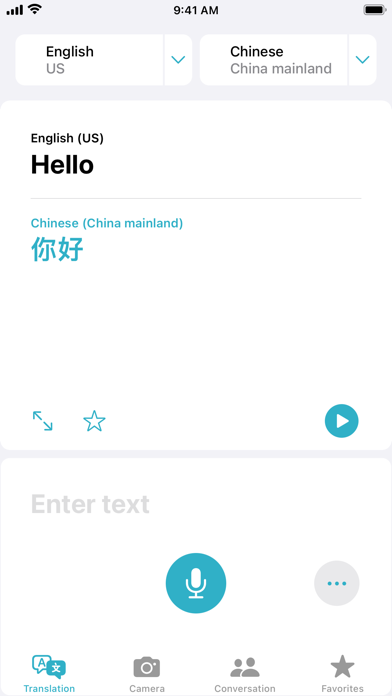
Translate lets you quickly and easily translate your voice and text between languages. Designed to be the best and easiest-to-use app for translating phrases, conversations, and even the text around you. Translate combines high-quality translations with an intuitive design, so that translating is quick and easy. Features • Text translation — Text translation is fast, simple, and intuitive. All supported languages include their keyboards so you don't have to download or manually switch between them • Dictionary — Tap a word in a completed translation to see the definition in the built-in dictionary • Translate camera — Translate text around you using the camera view. Translate text in real-time, pause the view to zoom in for a closer look, or translate text in photos from your Photos library • Auto Translate — Translate speech without tapping the microphone button in a conversation. Auto Translate automatically detects when you start speaking and when you stop, so the other person can just respond • Voice translation — Translate your voice from one language to another. The app detects which of the two selected languages you're speaking and provides the translated text and audio in the other language • Conversations — In the Conversation tab, tap the single microphone button to speak, and automatic language detection will transcribe what you say in chat bubbles on the correct side of the conversation • Face to face view — Change the conversation view when chatting face to face so that each person can see the conversation from their own side • Live Translation with AirPods (iPhone only) — Hear, hands-free, in your preferred language with AirPods to help you bridge language barriers in person • On-device mode — Enable a fully offline experience in Translate and for downloaded languages. Keep your translations private without needing to turn off your internet connection • Favorites — For phrases you use frequently and want to keep, save them to your Favorites for easy access later Translate currently supports translation between any combination of these languages: • Arabic • Chinese (Mandarin - China Mainland) • Chinese (Mandarin - Taiwan) • Dutch • English (US) • English (UK) • French (France) • German (Germany) • Indonesian • Italian (Italy) • Japanese • Korean • Polish • Portuguese (Brazil) • Russian • Spanish (Spain) • Thai • Turkish • Ukrainian • Vietnamese NOTE: The languages listed above are supported in the most recent operating system. Not all languages may be available in previous operating systems. Live Translation with AirPods requires an iPhone running iOS 26 paired with AirPods 4 (ANC) or AirPods Pro 2 and later and is supported in English (US, UK), French (France), German (Germany), Portuguese (Brazil), and Spanish (Spain).


