

WorkTime: Shift Work Calendar
Screenshots



ASO analysis
Tight against the limit — verify it doesn't truncate on small screens.
Could go longer. The first 252 chars are above-the-fold; everything else still indexes.
Used by similar apps in your niche, but not in your title or description. Adding these (where genuinely relevant) can broaden your search reach.
Words you and your peers both use. Confirms positioning in this niche.
Keyword rankings
iTunes Search · top 200About
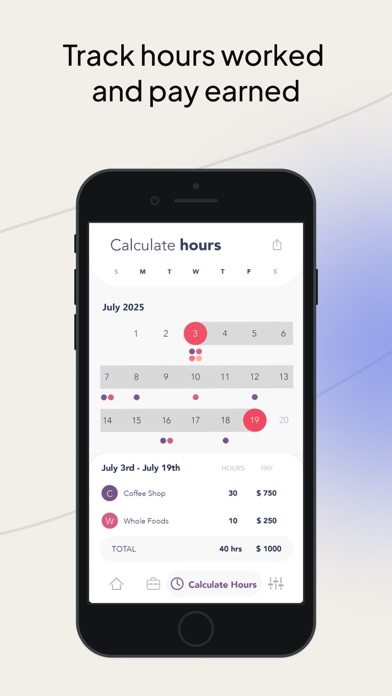
TRACKING WORK SHIFTS HAS NEVER BEEN EASIER. WorkTime is the shift calendar trusted by over 1,000,000 workers. Set your shift times, see them all at a glance, set alerts, add up your hours, and share your schedule. Do you work rotating shifts, irregular hours, or random days? WorkTime tracks your entire work schedule on one clean calendar. Enter shifts with just two taps. See your whole month at a glance. No more scribbling shifts on scraps of paper. FEATURES • See all your shifts at a single glance on a unique time-display calendar • Enter shift start times with just two taps • Add shifts quickly from your Recent Shifts list • Add notes and reminders to any day • Share your schedule via email or save it as a photo • Share multiple months at once PREMIUM FEATURES • Add unlimited jobs • Track hours worked and wages with the Hours Calculator • Set alerts to remind you before an upcoming shift • Ad-free interface • Sync to your phone's calendar SET AND NEVER FORGET. Set reminders based on how much time you need to get ready. WorkTime alerts you before every shift so you never miss one. BUILT FOR SHIFT WORKERS. Whether you're a nurse, barista, bartender, warehouse worker, retail associate, or anyone who works shifts — WorkTime is built for you. Subscription pricing and terms: WorkTime offers auto-renewing subscription options. Prices shown are for United States customers. Pricing in other countries may vary and actual charges may be converted to your local currency depending on the country of residence. Your subscription will automatically renew at the end of each term and your credit card will be charged through your App Store account. You can turn off auto-renew at any time from your device's Settings > Subscriptions. Refunds will not be provided for any unused portion of the term. Terms of Use: http://totoventures.com/terms-of-use/ Privacy Policy: http://totoventures.com/privacy-policy/


