

CAD Reader-View & Measure DWG
Screenshots


ASO analysis
Tight against the limit — verify it doesn't truncate on small screens.
Could go longer. The first 252 chars are above-the-fold; everything else still indexes.
Used by similar apps in your niche, but not in your title or description. Adding these (where genuinely relevant) can broaden your search reach.
Words you and your peers both use. Confirms positioning in this niche.
Keyword rankings
iTunes Search · top 200About
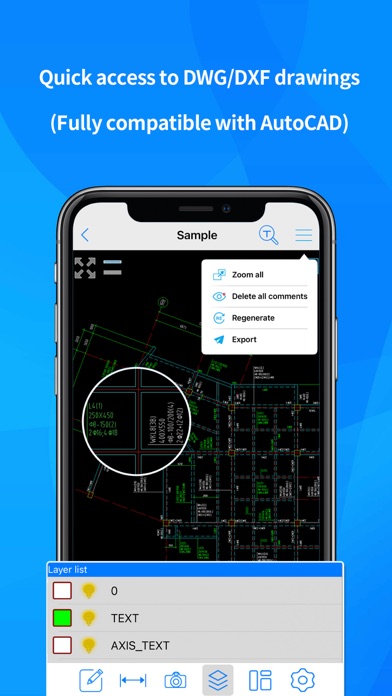
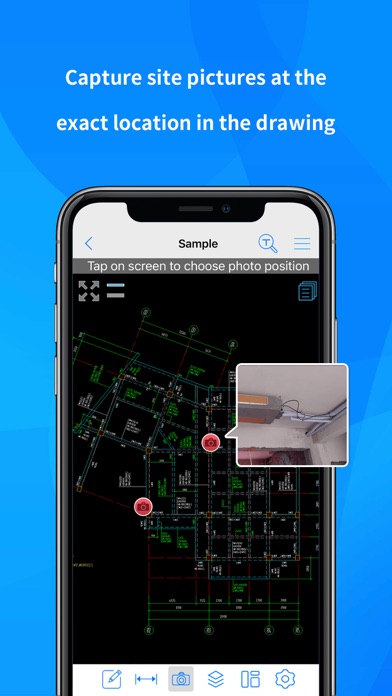
CADReader is a cross-platform CAD software that is fully compatible with DWG, DXF and PDF formats. It provides essential tools such as Viewing, Measuring and Annotations Tools to meet the demands of engineers, designers and quantity surveyors alike. CADReader Highlights: 1. Fast Access to Drawings • View multiple drawings at once (Fully compatible with AutoCAD) • Supports both DWG and DXF Formats 2. Quick Measurement Tools • Scale drawing tool • Continuous measure in length (m) • Measure polygon area (m2) • Measure radius, angles, arc length, coordinates etc. • Automatic snapping points for better accuracy 3. Efficient Collaboration Tools • Capture site pictures and attach as annotations • Record voice messages and attach as annotations • Draw lines, shapes, revision clouds • Import/Export drawing comments/annotations • Add texts 4. Advanced Features • Convert PDF to CAD • Layer management • Switching between model and layout view Still have questions? Feel free to contact our technical support via whatsapp or email, we provide 1-to-1 services for free! Email: cadreaderservice@gmail.com WA: https://wa.me/60167402995 Don't forget to follow our social media pages to learn more tips and tutorials! YouTube: https://www.youtube.com/@cadreader TikTok: https://www.tiktok.com/@officialcadreader LinkedIn: https://www.linkedin.com/company/cadreader/ Website: https://dwg.fastcadreader.com/


