

Feet Meter measure shoe size
Screenshots


ASO analysis
Tight against the limit — verify it doesn't truncate on small screens.
Could go longer. The first 252 chars are above-the-fold; everything else still indexes.
Used by similar apps in your niche, but not in your title or description. Adding these (where genuinely relevant) can broaden your search reach.
Words you and your peers both use. Confirms positioning in this niche.
Keyword rankings
iTunes Search · top 200About
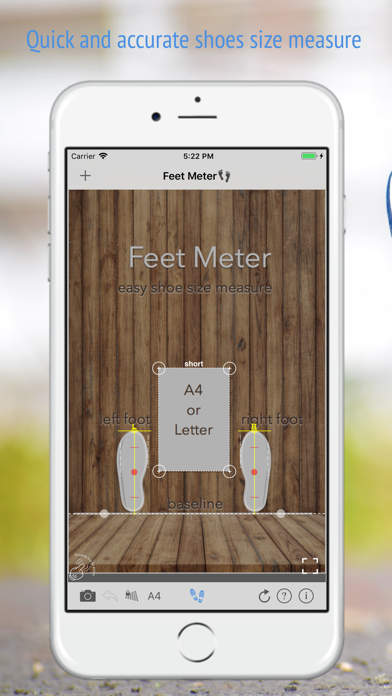
Quick and simple way to measure both feet length and width and check your shoe size by taking measurements on picture. Info, howto, tips: http://www.feetmeter.pro With Feet Meter you can measure feet length and width quickly and check your shoe size using your camera and a standard sheet of paper. Now you can find out your fitting shoe size before making an online order. What you need: iPhone with Feet Meter installed Sheet of paper (A4 or US letter) Flat and even floor bounded by wall or curb Features: - take or upload picture from the gallery - shoe size conversion charts for different regions (USA, Europe, Brazil, UK, Japan & China) - Man / Woman / Kid shoe size charts - length and width of each feet in centimeters (cm) and inches (in) - width: narrow, regular, wide - picture zoom in/out for accurate alignment and measurements How to measure shoe size: 1. Stand against a wall with heels touching the wall (barefoot or wearing thin socks, no shoes!) and toes pointing forward 2. Place a reference, sheet of paper A4 or US letter, on the floor (see online guide or screenshots). Take a picture. 3. Upload picture into the app and mark the reference with the frame on the screen (pay attention to the short side label and selected sheet size) 4. Mark wall/floor joint line using control points of the baseline 5. Use top control points of the foot rulers to mark the longest toes of your feet and width 6. Press “Shoe prints” button to see the length and width of your feet and shoe size chart * * use measurements of the larger foot when buying shoes If you like the app and find it useful please support us with your feedback and comment. Feel free to contact support@vistechprojects.com with any questions or comments. Thank you, VisTech.Projects Team.


