AppScoutAppScout.gallery
Measuring Tape icon
Utilities

Measuring Tape

by Boris Kalinin
Rating4.2(165)
Price$2.99
Updated5mo ago
Released13y ago
Latest rank
#19
Top Paid · Utilities
Rank change
↓ 5
vs last refresh
Rank history
Movement appears after the next data refresh.
Charting in:AU·Top Paid#19↓5

Screenshots

Measuring Tape screenshot 1

ASO analysis

Title14 / 30
Measuring Tape

Good use of the title field.

Description1,027 / 4,000
7 paragraphs · 26% of limit used

Could go longer. The first 252 chars are above-the-fold; everything else still indexes.

Top keywords in your description
point×8distance×5application×4counters×3air×2increase×2measurement×2outdoor×2real×2reset×2ruler×2starting×2
Keyword opportunities

Used by similar apps in your niche, but not in your title or description. Adding these (where genuinely relevant) can broaden your search reach.

features7 peersarea5 peerseasy5 peersmetric5 peerssave5 peersworks5 peersanything4 peersbuilt-in4 peerscalculate4 peerscustom4 peers
Shared niche keywords

Words you and your peers both use. Confirms positioning in this niche.

measure8 peersmeasurements6 peersmeasurement5 peersmeasuring5 peerstape5 peerstime5 peersreal4 peersdistance3 peerspoint3 peerssimply3 peers

Keyword rankings

iTunes Search · top 200
Keyword tracking starts automatically for apps on the top charts — ranks appear after the next data refresh. Manual tracking for search-only and niche apps coming soon.

About

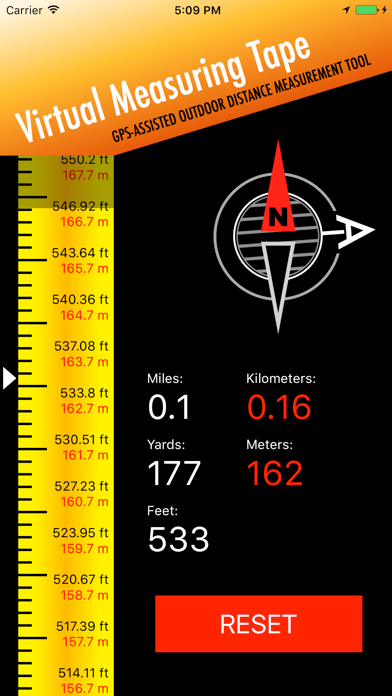
This application measures the shortest (air) distance between point A and point B using GPS, with the maximum available accuracy. Distances are displayed in yards, meters, kilometers, and miles. Simply reset the ruler at point A and watch the distance counters increase as you move toward point B—just like using a real tape measure or ruler. Primary uses for approximate sizing and measuring include: Land, grounds, and properties Real estate Golf course yardage Sports facilities and tracks Air distance Other outdoor measurements The application is intended for outdoor use only and requires location services to be enabled. How to use: Go to the starting point (A) and press the RESET button to initialize the distance counters. Walk to the target point (B) while watching the distance counters increase. The point A arrow continuously shows the direction back to the starting point. You can close the application at any time during a measurement. When reopened, the application will continue the current measurement.

01
Measuring Tape PRO icon
Measuring Tape PRO
Aexol Studio
4.2
02
Tape Measure™ icon
Tape Measure™
Level Labs, LLC
4.3
03
Tape Measure Calculator Pro icon
Tape Measure Calculator Pro
Bugfoot Studios LLC
4.9
04
MeasureBetter icon
MeasureBetter
TEN3 Software LLC
0.0
05
MyMeasure icon
MyMeasure
Pendlebury Software LLC
4.0
06
Tapmining: Miner Tool icon
Tapmining: Miner Tool
BO Team
2.8
07
Ultra Measure Master icon
Ultra Measure Master
Calculated Industries
5.0
08
Screen Mirroring | Smart TV icon
Screen Mirroring | Smart TV
Level Clash Apps S.L.
4.5
09
GPS Fields Area Measure Map icon
GPS Fields Area Measure Map
Rento UAB
4.5
10
Planimeter Pro for map measure icon
Planimeter Pro for map measure
忠 张
4.3