

Parental Control App-FamiSafe
Screenshots





ASO analysis
Tight against the limit — verify it doesn't truncate on small screens.
Solid length. Make sure the first 252 chars hook the reader.
Used by similar apps in your niche, but not in your title or description. Adding these (where genuinely relevant) can broaden your search reach.
Words you and your peers both use. Confirms positioning in this niche.
Keyword rankings
iTunes Search · top 200- parental control app3 data points#10↑1
- famisafe3 data points#1
About
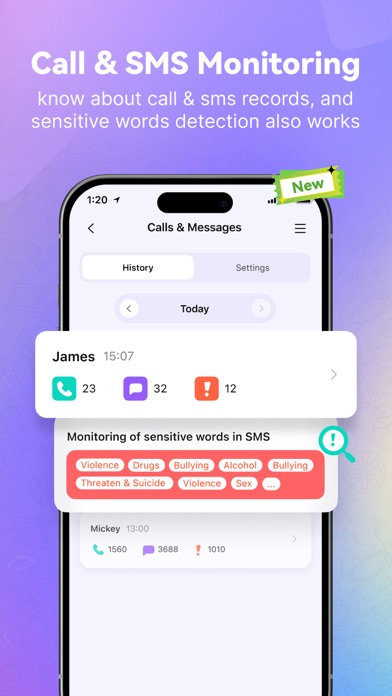
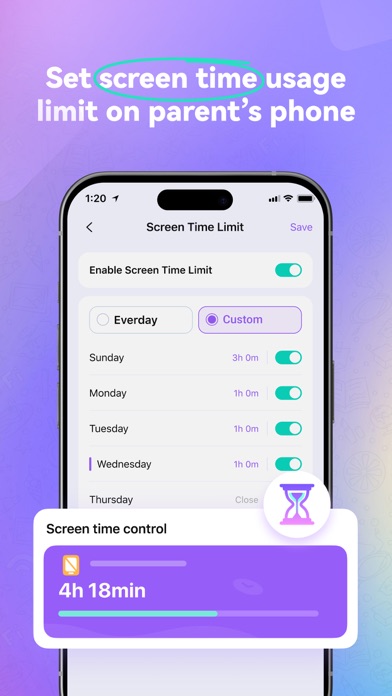
Keep your child safe online with FamiSafe, an all-in-one parental control app powered by AI. Build healthier device habits while protecting them with AI-driven social media monitoring, real-time GPS tracking, app limits, and screen time management. What’s New in FamiSafe v9.0 1. AI Semantic Analysis Across 30+ Platforms – Detect inappropriate, harmful, or risky content on Instagram, TikTok, WhatsApp, Snapchat, Discord, YouTube, and more. Works 24/7 while respecting your child’s privacy. 2. Visual Activity Timelines – Spot screen time patterns, unusual behavior, or location changes at a glance. Key Features AI-Powered Social Media Monitoring - Get instant alerts for suspicious messages, photos, or sensitive words across all major platforms. - Monitor social activity safely without reading all private conversations. - AI identifies potential risks so you can proactively protect your child. Screen Time Control - Set rules to help your child develop healthier app habits. - Remotely track time spent on specific apps. GPS Location Tracker - View your child’s real-time location to ensure physical safety. - Check location history to understand daily routines. App Blocking & Limits - Receive alerts when your child tries to open blocked apps. - Restrict or block inappropriate apps and games. SOS / Panic Alerts - Your child can send an SOS with location in one second when feeling unsafe. View TikTok & YouTube History - Track activity and usage time to encourage better online habits. Device Activity Report - Track app usage and device activities remotely. - See which apps are installed or uninstalled. Calls & Messages Monitoring - Keyword detection and emoji monitoring protect your child from potential dangers on calls and texts. Screen Viewer - Remotely view your child’s screen in real-time or at intervals. - AI automatically detects inappropriate content to keep your child safe. Why Choose FamiSafe? Trusted by parenting organizations: - Best Products for Elementary Kids 2024 - National Parenting Product Awards Winner 2024 - Best Middle & High School Products 2024 - Best Family Health & Safety Products 2024 Combines AI-driven social media monitoring with comprehensive parental control for all-around protection. Getting Started 1. Install FamiSafe by scanning a QR code or entering a pairing code. 2. Register an account and log in. 3. Create a personalized plan for your child and start protecting them online today! Full user guide: https://famisafe.wondershare.com/user-guide FAQs - Languages supported: English, Spanish, French, German, Italian, Portuguese, Japanese, and Korean. - Multiple devices: One account can manage up to 30 mobile devices or tablets. Policies & Terms of Use Privacy Policy: https://www.wondershare.com/privacy.html EULA: https://famisafe.wondershare.com/eula.html Contact: customer_service@wondershare.com


