
RemoteFlight AUTOPILOT
Screenshots
ASO analysis
Good use of the title field.
Could go longer. The first 252 chars are above-the-fold; everything else still indexes.
Used by similar apps in your niche, but not in your title or description. Adding these (where genuinely relevant) can broaden your search reach.
Words you and your peers both use. Confirms positioning in this niche.
Keyword rankings
iTunes Search · top 200About
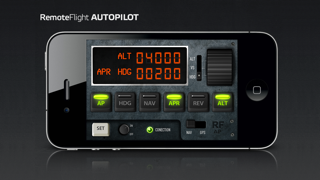
The title says it all, this gauge replaces generic autopilot panel and delivers features like HDG, VS, NAV, APR. All standard autopilot functions from FS9 and FSX default aircafts are available in this gauge. We've even added some features that are not present on classic Bendix/King, but we thought would be useful to be able to control heading or NAV/GPS slaving from this panel. Compatible with FSX/FS9/P3D/X-Plane (Windows and OSX) [Features] * Complete replacement of default autopilot panel * Heading and altitude hold * Climb/descent with vertical speed hold * Approach / nav hold - works with VOR or ILS (with glideslope) * Additional NAV / GPS slaving switch * Additional setting of HDG hold direction RemoteFlight Server utility is required to establish the connection between Flight Simulator and your device. RemoteFlight server is very lightweight and will not affect the performance of your Flight Simulator. Download the server free on https://www.remoteflight.net/server