AppScoutAppScout.gallery
Save to Dropbox for Safari icon
Utilities

Save to Dropbox for Safari

by Denk Alexandru
Rating0.0(0)
Price$2.99
Updated7mo ago
Released7y ago
Latest rank
Not tracked yet
Rank change
Not tracked yet
Rank history
Movement appears after the next data refresh.

Screenshots

Save to Dropbox for Safari screenshot 1Save to Dropbox for Safari screenshot 2

ASO analysis

Title26 / 30
Save to Dropbox for Safari

Good use of the title field.

Description1,083 / 4,000
5 paragraphs · 27% of limit used

Could go longer. The first 252 chars are above-the-fold; everything else still indexes.

Top keywords in your description
cloud×6dropbox×5save×5day×3directly×3extension×3file×3documents×2files×2folder×2image×2images×2
Keyword opportunities

Used by similar apps in your niche, but not in your title or description. Adding these (where genuinely relevant) can broaden your search reach.

content5 peerspage5 peerssettings5 peersweb5 peersworks5 peersautomatically4 peersbrowser4 peersbrowsing4 peerscontrol4 peersenable4 peers
Shared niche keywords

Words you and your peers both use. Confirms positioning in this niche.

extension10 peerssafari10 peersfeatures7 peersios7 peerssimple6 peerssupport6 peerstime6 peersmacos5 peersacross4 peersdevices4 peers

Keyword rankings

iTunes Search · top 200
Keyword tracking starts automatically for apps on the top charts — ranks appear after the next data refresh. Manual tracking for search-only and niche apps coming soon.

About

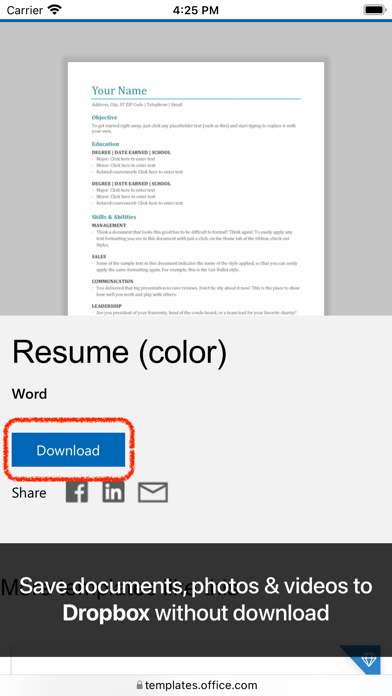
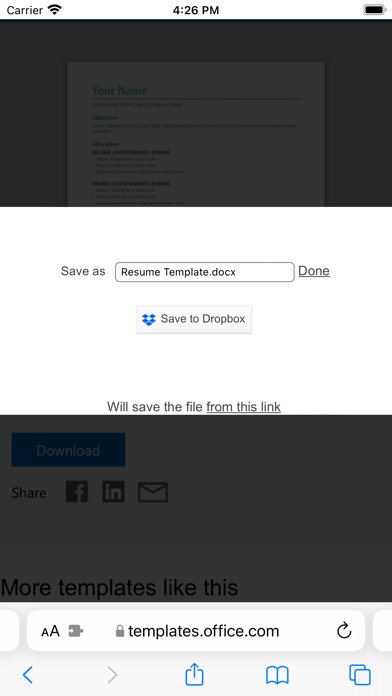
• Available on all your devices, on iOS, iPad and macOS • With this simple Safari extension you can save files, documents, images or videos directly to Dropbox without downloading them first. Save to Cloud (for Dropbox) is a great tool, just a click away, ready to use every time you need to save in the cloud important files you come across the internet. HOW TO USE IT • Open the extension and select Activate Save to Cloud. Press on a document hyperlink, an image or video and your file will be sent to Dropbox directly • You can also choose exactly in what folder from Dropbox you want to transfer your file FEATURES • A simple and powerful Safari extension • Save documents, images or videos directly to Dropbox without download • Send any image or favourite video to the cloud • Select text hyperlinks and send it to the cloud • Change the name of the file and the target folder on your cloud platform We read your support emails every day, day by day. Write with confidence any question, feedback or complaint and you will receive an answer in a very short period of time.

01
Highlighter for Safari icon
Highlighter for Safari
Denk Alexandru
4.0
02
Vidimote for Safari icon
Vidimote for Safari
IOSPIRIT GmbH
4.5
03
Total Refresh for Safari icon
Total Refresh for Safari
William Walker
0.0
04
Mapper for Safari icon
Mapper for Safari
Alex Kitcoff
4.0
05
Home Tab for Safari icon
Home Tab for Safari
Stefan Van Damme
5.0
06
Enable Copy for Safari icon
Enable Copy for Safari
Denk Alexandru
0.0
07
Noir - Dark Mode for Safari icon
Noir - Dark Mode for Safari
Jeffrey Kuiken
4.6
08
Simple Refresh for Safari icon
Simple Refresh for Safari
William Walker
5.0
09
Lucky for Safari icon
Lucky for Safari
And a Dinosaur
5.0
10
Auto Scroll for Safari icon
Auto Scroll for Safari
Lotus Core
1.0