AppScoutAppScout.gallery
Snap Markup - Annotation Tool icon
Utilities

Snap Markup - Annotation Tool

by Raghvendra Bhargava
Rating4.5(210)
Price$1.99
Updated6mo ago
Released10y ago
Latest rank
Not tracked yet
Rank change
Not tracked yet
Rank history
Movement appears after the next data refresh.

Screenshots

Snap Markup - Annotation Tool screenshot 1Snap Markup - Annotation Tool screenshot 2Snap Markup - Annotation Tool screenshot 3Snap Markup - Annotation Tool screenshot 4Snap Markup - Annotation Tool screenshot 5Snap Markup - Annotation Tool screenshot 6Snap Markup - Annotation Tool screenshot 7Snap Markup - Annotation Tool screenshot 8

Estimates

low confidence
Downloads / month
2.8K–11K
Review-velocity signal only
Revenue / month
$3.9K–$16K
After Apple's 30% cut

ASO analysis

Title29 / 30
Snap Markup - Annotation Tool

Tight against the limit — verify it doesn't truncate on small screens.

Description1,481 / 4,000
6 paragraphs · 37% of limit used

Could go longer. The first 252 chars are above-the-fold; everything else still indexes.

Top keywords in your description
images×6photos×6markup×4annotation×3friends×3share×3text×3add×2blank×2crop×2drawing×2effortlessly×2
Keyword opportunities

Used by similar apps in your niche, but not in your title or description. Adding these (where genuinely relevant) can broaden your search reach.

time7 peerswhether6 peersdownload5 peershelps5 peershttps5 peersview5 peersadvanced4 peersanyone4 peerscontrol4 peersdesigned4 peers
Shared niche keywords

Words you and your peers both use. Confirms positioning in this niche.

support7 peersquickly6 peersfeatures5 peerssave5 peerscreate4 peerseasily4 peerswithout4 peersadd3 peerscom3 peersdetails3 peers

Keyword rankings

iTunes Search · top 200
Keyword tracking starts automatically for apps on the top charts — ranks appear after the next data refresh. Manual tracking for search-only and niche apps coming soon.

About

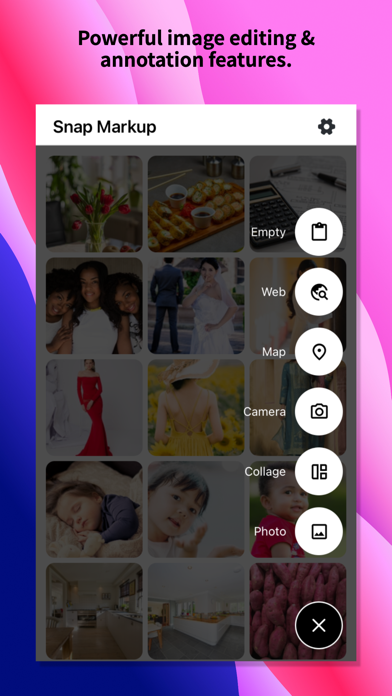
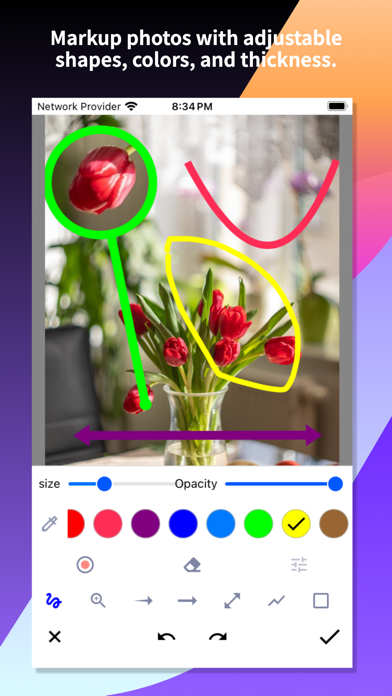
Snap Markup is an easy-to-use and powerful photo markup tool. It offers a variety of annotation features such as cropping, adding text, pixelating images, drawing arrows, rectangles, circles, lines, freehand drawing, curves, triangles, and more. It allows you to edit and markup your photos effortlessly and share them quickly with your friends! Key Features: - Crop and rotate images: can be cut into rectangular, round, star, triangle, and other shapes - Highlight key info: spotlight important details - Blur images: pixelate to cover areas you don't want to show - Magnify images: zoom in on selected sections with a loupe - Add emoji stickers: make your photos lively and interesting - Add text on photos: customise text colour, background, shadow, stroke, style, size, and more - Annotate pictures with all necessary tools: Arrow, Rect, Circle, Pen - Direct annotation of large pictures without needing to crop first - Import photos from your gallery, save in HD, and share with friends - High-quality, lossless saving in PNG and JPG formats - Support for multiple languages Stitching Photos: Easily stitch multiple photos into panoramic images, horizontally and vertically. Webpage and Map Annotation: Mark up web pages and maps effortlessly, and share your ideas with friends. Blank Image Creation: Create blank images and draw according to your needs. For comments or suggestions on Snap Markup, please contact us at support@appculus.com. We appreciate your feedback!

01
Tag My Spool icon
Tag My Spool
KraftPixel Digital Solutions Pvt Ltd
5.0
02
GPS Navigation and GPS Maps icon
GPS Navigation and GPS Maps
Hoang Hang
3.4
03
Mixing Station icon
Mixing Station
David Schumann
3.8
04
Mammotion icon
Mammotion
深圳库犸动力科技有限公司
3.4
05
Chippy Tools: Construction icon
Chippy Tools: Construction
Peth Pty Ltd
4.7
06
Tap Tool Pro icon
Tap Tool Pro
Simon McMenzie
4.4
07
Tag Station icon
Tag Station
Pave Vaisanen
0.0
08
Snap Print: Scan, Edit & Print icon
Snap Print: Scan, Edit & Print
Ha Nguyen
0.0
09
Location Tracker: Find My Hub icon
Location Tracker: Find My Hub
Hoang Vixtor
4.3
10
Smart Tools Pro - SmartTools icon
Smart Tools Pro - SmartTools
Shajir Kalady
5.0