AppScoutAppScout.gallery
Pointer Remote for PowerPoint and Keynote icon
Productivity

Pointer Remote for PowerPoint and Keynote

by Zentropy Software
Rating1.0(3)
Price$19.00
Updated7y ago
Released7y ago
Latest rank
#72
Top Paid · Productivity
Rank change
↓ 1
vs last refresh
Rank history
Movement appears after the next data refresh.
Charting in:BR·Top Paid#72↓1MX·Top Paid#79↓1

Screenshots

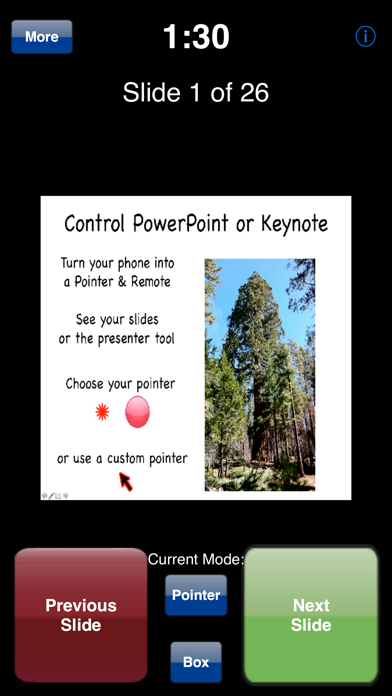
Pointer Remote for PowerPoint and Keynote screenshot 1

ASO analysis

Title41 / 30
Pointer Remote for PowerPoint and Keynote

Over the 30-character limit by 11 — Apple will truncate on display.

Description1,211 / 4,000
5 paragraphs · 30% of limit used

Could go longer. The first 252 chars are above-the-fold; everything else still indexes.

Top keywords in your description
pointer×5computer×4ipad×4iphone×4keynote×3controls×2mac×2network×2note×2please×2powerpoint×2presentation×2
Keyword opportunities

Used by similar apps in your niche, but not in your title or description. Adding these (where genuinely relevant) can broaden your search reach.

simple5 peersapple4 peersdevices4 peersdrag4 peersfast4 peersgreat4 peerskeyboard4 peersphone4 peerspro4 peersslides4 peers
Shared niche keywords

Words you and your peers both use. Confirms positioning in this niche.

iphone6 peersmac6 peerspresentation6 peerspresentations6 peerstouch6 peerscom5 peerscontrol5 peersipad5 peersremote4 peerssupport4 peers

Keyword rankings

iTunes Search · top 200
Keyword tracking starts automatically for apps on the top charts — ranks appear after the next data refresh. Manual tracking for search-only and niche apps coming soon.

About

Turn your iPhone or iPad into a pointer and controller for PowerPoint or Keynote presentations. Has 'Next Slide' and 'Previous Slide' controls, and can show notes from presentations on the iPhone display along with a timer. Pointer icon can easily by replaced by any image, which could be used for humorous purposes. Touch the screen to show the pointer - which is controlled either by dragging your finger around the screen (easy) or by orientation (takes a little practice) - your choice. Requirements: Computer running Mac OS X 10.7 or higher, WiFi connection (on the same local network or by creating a computer-to-computer network), and PowerPoint or Keynote (choose the program on the back side of the App). Please note that this app cannot control an iPad Keynote presentation. A small Mac application, PointerServer, must be downloaded to your computer and started whenever Pointer is used. This program is available for free at: http://www.zentropysoftware.com/ZS/Pointer_files/PointerServer3.zip Please note that the presentation runs on your computer, not directly from the iPhone or iPad. Instead the iPhone/iPad controls the computer. A support e-mail address is listed at the support web site.

01
Clicker – Presentation Remote icon
Clicker – Presentation Remote
AppTrix AB
0.0
02
PrompterPal icon
PrompterPal
Sunshine Valley Systems
3.0
03
Microsoft PowerPoint icon
Microsoft PowerPoint
Microsoft Corporation
4.7
04
Remoter VNC - Remote Desktop icon
Remoter VNC - Remote Desktop
Remoter Labs LLC
4.2
05
iA Presenter icon
iA Presenter
Information Architects AG
0.0
06
Templates for PowerPoint Pro icon
Templates for PowerPoint Pro
Made for Use
0.0
07
aRDP Pro - RDP Remote Desktop icon
aRDP Pro - RDP Remote Desktop
iordan iordanov
4.6
08
Klappo icon
Klappo
Miguel Furst
0.0
09
Yam Display icon
Yam Display
Yamstu Inc.
4.8
10
Teleprónter icon
Teleprónter
Teleprompter LLC
4.7