AppScoutAppScout.gallery
SunWatch for SMA icon
Lifestyle

SunWatch for SMA

by Oebele Beetstra
Rating0.0(0)
Price$1.99
Updated2y ago
Released6y ago
Latest rank
Not tracked yet
Rank change
Not tracked yet
Rank history
Movement appears after the next data refresh.

Screenshots

SunWatch for SMA screenshot 1

ASO analysis

Title16 / 30
SunWatch for SMA

Good use of the title field.

Description948 / 4,000
5 paragraphs · 24% of limit used

Could go longer. The first 252 chars are above-the-fold; everything else still indexes.

Top keywords in your description
sma×4watch×4panels×3portal×3sunny×3account×2automatically×2connected×2installation×2inverter×2please×2solar×2
Keyword opportunities

Used by similar apps in your niche, but not in your title or description. Adding these (where genuinely relevant) can broaden your search reach.

home6 peerstime6 peerscomplications5 peersios5 peersright5 peersshow5 peersactivity4 peersamount4 peersdesign4 peersexperience4 peers
Shared niche keywords

Words you and your peers both use. Confirms positioning in this niche.

watch9 peersapple8 peersface7 peersdata6 peersiphone6 peerscomplication5 peerscurrent4 peersinformation4 peersmonitor4 peersenergy3 peers

Keyword rankings

iTunes Search · top 200
Keyword tracking starts automatically for apps on the top charts — ranks appear after the next data refresh. Manual tracking for search-only and niche apps coming soon.

About

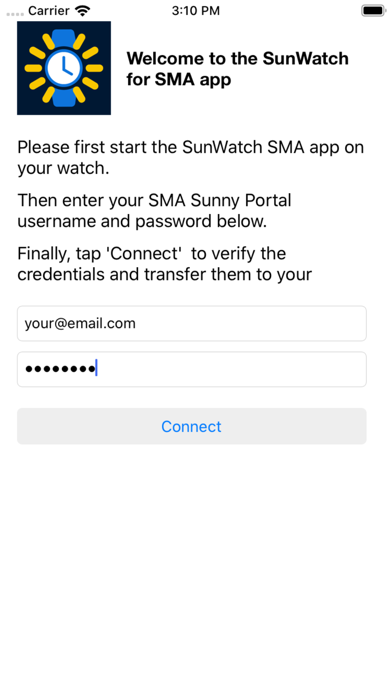
Did you install solar panels on your roof? And are they connected to an inverter built by SMA? If so, you can use this app to monitor your PV installation from your Apple Watch! The app displays how much power and energy your solar panels are generating. This information is displayed both in numbers and in a graph and is automatically updated every 30 minutes. A so called complication for your watch is included as well. This allows you to see the current output of your panels on the face of your watch! In order to view the data of your PV installation, please first start the app on your iPhone and login using the same account you use for logging in to the SMA Sunny Portal website. Your credentials will then automatically be transferred to your watch. Please beware that your SMA inverter needs to be connected to SMA's Sunny Portal, using e.g. an SMA WebConnect or WebBox device. And you need an account for the Sunny Portal website.

More from Oebele Beetstra

01
Pi Monitor icon
Pi Monitor
Oebele Beetstra
5.0
02
SunWatch for SolarEdge icon
SunWatch for SolarEdge
Oebele Beetstra
0.0
01
SunWatch for SolarEdge icon
SunWatch for SolarEdge
Oebele Beetstra
0.0
02
Smartwatch Pro for Pebble icon
Smartwatch Pro for Pebble
Max Bäumle
1.0
03
Solar Watch for SolarEdge icon
Solar Watch for SolarEdge
Marko Radakovic
3.1
04
EV Watch for Tesla icon
EV Watch for Tesla
Excelsis Consulting
4.5
05
Watch Cam for Nest Cam icon
Watch Cam for Nest Cam
Marko Radakovic
4.5
06
TimeShow: Smart Watch faces icon
TimeShow: Smart Watch faces
北京小问智能科技有限公司
5.0
07
Aviation Altimeter for Watch icon
Aviation Altimeter for Watch
Aviametrix, LLC
0.0
08
TXT Novel Reader for Watch icon
TXT Novel Reader for Watch
柱荣 李
3.8
09
Switch for Sonos icon
Switch for Sonos
强 李
0.0
10
Thermo Watch for Nest & Ecobee icon
Thermo Watch for Nest & Ecobee
Marko Radakovic
3.8